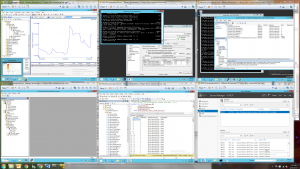
 With the advent of hardware virtualization, GCI has begun to explore this new technology for applicable uses in industrial automation. Virtualized hardware environments not only provide the ability to separate the development from the physical hardware, but also allow multiple configurations to be developed and tested without risk of disturbing an existing hardware layout.
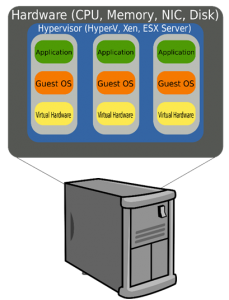
GCI has recently utilized several tools available from VMware for specifically these reasons. VMware’s server virtualization installation, vSphere Hypervisor, provided a flexible “sandbox” environment for testing a customer’s desired changes to their plant’s hardware setup without the need to modify the hardware that was already in place. This setup allowed for the complete virtualization of multiple devices and servers, as well as a virtualized network architecture, all on a single physical server running the hypervisor installation. The need for only one physical server to host the entire virtual environment was one benefit from the hypervisor setup.
Virtualizing an entire existing environment can be done with ease through the use of VMware’s vCenter Converter application. The process involves capturing a “snapshot” of each component in the existing system, and can even be done while the physical system is live. These snapshots contain the exact software and data configuration as the original physical systems, and can be run virtually either from a standalone virtual machine player or hypervisor. Combining the hypervisor setup with multiple collected snapshots creates a powerful virtualization environment that can handle many of these snapshots running on a single physical server.
Once snapshots of each system are captured, they establish a base environment for testing the desired modifications. They can all be loaded to one hypervisor server and set up on a virtual isolated network. This starting point can now be modified, tested, broken, and rebuilt, all with the ability to return to the original state and without risk of harming the existing physical system. Multiple snapshots can be taken throughout the installation and configuration process, making it easy to return to an exact environment state if one step goes wrong. This method also allows the ability to compare multiple configuration routes, and switch between them during development.
With this virtualized setup, the network design and configuration work for a complex project could take place away from the physical location once the snapshot was taken. Once the snapshots are captured, they can be loaded into any hypervisor configuration at any location. This eliminates the possibility of travel time and undesirable or inaccessible working locations.
Yet another benefit includes the use of this environment for documentation, creation of installation scripts, and validation. The ability to roll back to previous snapshots is very helpful when documenting specific steps of an installation procedure. Many different steps can be tested along the way for the best outcome, then once the modified virtual environment is configured and working the installation steps can be documented and later implemented on the physical system. The final configuration can also be tested within this virtual environment, with the ability to manage multiple virtual networks and observe system changes without harming the physical setup. Since any problems with the installation are sorted out in the virtualized environment beforehand, downtime and unexpected problems with the physical hardware during deployment can be kept to a minimum.